Using Custom Functions With Java RESTful
The Java RESTful Engine ships with many functions, however, you may find from time to time you require a function customized to your needs that does not exist in our library. The Engine allows you to define your own custom macro functions, package them in a JAR file, and use them in your templates just like any built-in function.
This article explains how to install a custom function JAR in the Java RESTful Engine when it is running in a new Docker container, in an existing Docker container, or in a manual Tomcat installation.
How It Works
Unlike the embedded Java Engine, the RESTful Engine does not have a jars directory that is scanned for custom function files. Instead, two things are required:
- The custom function JAR must be on the RESTful Engine's classpath, which means placing it in the
WEB-INF/libdirectory of the RESTful Engine web application (/usr/local/tomcat/webapps/ROOT/WEB-INF/libin the Docker image). - The
function.filesproperty must be set to the fully qualified class name of your custom function class (not the path to the JAR file). To load more than one class, separate the class names with a semicolon, for examplecom.mycompany.FunctionsOne;com.mycompany.FunctionsTwo.
function.files takes class names, not file paths. If you set it to the path of a JAR file, the engine logs a Failed to load custom functions warning and the functions are not registered.
Requirements
- A Java RESTful Engine, version 24.2.0+ if you want to set
function.filesthrough an environment variable in Docker - A compiled JAR containing your custom function class
- The fully qualified class name of that class, for example
com.apryse.FluentCustom.FluentCustomFunctions
Create the Custom Function
Create and build your custom function class the same way you would for the embedded Java Engine. The steps are covered in our custom sample located in our fluent-code-samples repo under the Embedded Java Engine Samples > Advanced > CustomFunctions. You can find that here.
Build the project to produce a JAR file (for example FluentCustomFunctions.jar). The class name to use for function.files in this example is com.apryse.FluentCustom.FluentCustomFunctions.
Installing the Custom Function
Choose the section that matches how your RESTful Engine is running:
New Docker Container
Start a container from the Fluent RESTful image and set the
function.filesenvironment variable to your class name. For more information on running the container, see Install Fluent Java RESTful Engine With Docker CLI.docker run -d -p 8080:8080 -e license={YOUR_LICENSE_KEY} -e function.files=com.apryse.FluentCustom.FluentCustomFunctions --name <containerName> {IMAGE_ID}If you are using Docker Desktop, add
function.filesin the Environment Variables section of the run dialog instead.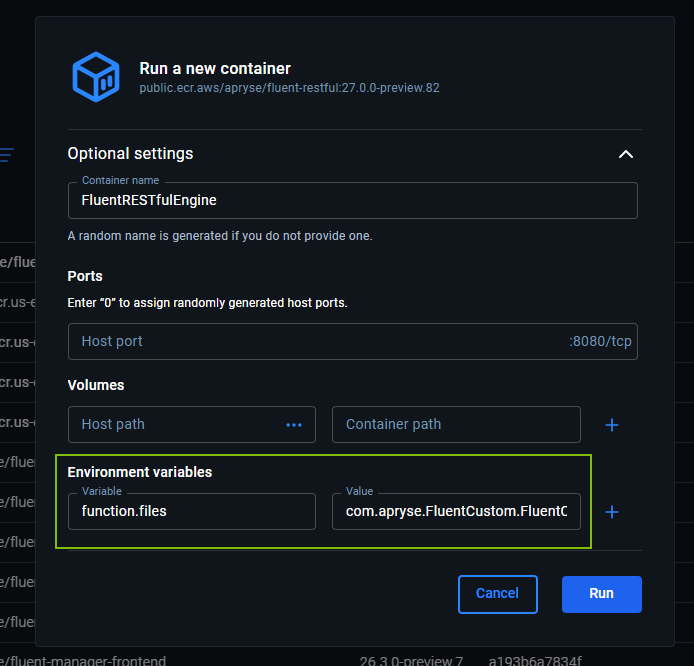
Wait for the container to finish starting. The engine web application is unpacked into
/usr/local/tomcat/webapps/ROOTthe first time the container starts.Copy your JAR file into the engine's
WEB-INF/libdirectory:docker cp "C:\path\to\FluentCustomFunctions.jar" <containerName>:/usr/local/tomcat/webapps/ROOT/WEB-INF/lib/Restart the container so the engine registers the function:
docker restart <containerName>
The first time the container starts, before the JAR has been copied in, the log will contain a Failed to load custom functions warning. This is expected and goes away after the restart in the last step.
Existing Docker Container
Environment variables cannot be added to a container that has already been created, so for an existing container you can either set the property in the engine's WindwardReports.properties file inside the container, or recreate the container with the environment variable.
Option 1: Edit the properties file in the container
Copy your JAR file into the engine's
WEB-INF/libdirectory:docker cp "C:\path\to\FluentCustomFunctions.jar" <containerName>:/usr/local/tomcat/webapps/ROOT/WEB-INF/lib/Copy the engine's properties file out of the container:
docker cp <containerName>:/usr/local/tomcat/webapps/ROOT/WEB-INF/classes/WindwardReports.properties .Open the copied
WindwardReports.propertiesfile and add the following line:function.files=com.apryse.FluentCustom.FluentCustomFunctionsCopy the file back into the container:
docker cp WindwardReports.properties <containerName>:/usr/local/tomcat/webapps/ROOT/WEB-INF/classes/Restart the container:
docker restart <containerName>
Option 2: Recreate the container
Stop and remove the existing container, then follow the steps in New Docker Container.
Files that you copy into a container with docker cp, including the custom function JAR and any edits to WindwardReports.properties, are kept when the container is restarted but are lost when the container is removed and recreated. This includes upgrading to a newer engine image. After recreating a container, repeat the installation steps for your custom function.
Manual Tomcat Installation
These steps apply when you deployed the RESTful Engine to your own Tomcat server by following Setting Up the Java RESTful Engine.
Make sure the engine has started at least once so that Tomcat has unpacked
ROOT.warinto the/Tomcat/webapps/ROOTdirectory.Copy your JAR file into
/Tomcat/webapps/ROOT/WEB-INF/lib.Open
/Tomcat/webapps/ROOT/WEB-INF/classes/WindwardReports.propertiesand add the following line, using your own class name:function.files=com.apryse.FluentCustom.FluentCustomFunctionsRestart the Tomcat server so the engine registers the function:
- On Windows, run the
shutdown.batbatch file, then thestartup.batbatch file - On Linux, run the
shutdown.shshell script, then thestartup.shshell script
- On Windows, run the
If you upgrade the engine by deleting the ROOT directory and deploying a new ROOT.war, your JAR and your WindwardReports.properties changes are removed with it. Repeat the steps above after the upgrade.
Verify the Custom Function
Add your custom function to a template. For the example above, add the following tag, which should output
My Custom Function works!:${CUSTOMFUNCTION()}Generate a document from the template using the RESTful Engine.
If the function was registered, its value appears in the generated document.
Troubleshooting
| Symptom | Cause and fix |
|---|---|
The generated document contains #NAME where the function should be | The engine did not register the function. Check the engine log for the warning below, and confirm that the JAR is in WEB-INF/lib, function.files is set, and the engine was restarted after making these changes. |
The log contains Failed to load custom functions from ... | function.files does not contain a loadable class name. Make sure it is the fully qualified class name (package and class) and not a file path, that the class is public, and that the JAR containing it is in WEB-INF/lib. |
| The warning persists after copying the JAR | The engine only loads custom functions at startup. Restart the container or Tomcat after copying the JAR or changing function.files. |
To view the engine log of a Docker container, run docker logs <containerName>.